
How we turn LinkedIn engagement into qualified pipeline
The Clay guide to social listening

How to turn LinkedIn engagement into qualified pipeline
Your team invests heavily in LinkedIn content. You’re paying creators, producing videos, running influencer programs. But you have no idea if the engagement actually matters.
Marketing measures engagement volume. Sales wants qualified leads. Ops is stuck in the middle, unable to translate “vibes into action.”
The disconnect is expensive. Marketing keeps spending on content that might not reach target accounts. Sales ignores LinkedIn signals because they don’t know which engagements come from qualified prospects versus random noise.
At Clay, we built a system that solves both problems. We automatically pull every reaction and comment on our posts, enrich the engagers with firmographic data, match them against our named account list, and route qualified leads directly to sales—all without manual work.
The result: We shifted from measuring “cost per engagement” to “cost per qualified engagement.” Marketing can finally prove ROI on LinkedIn investment. Sales actually wants us to produce more content because they’re getting actionable pipeline from it.
Here’s how we built it and how you can do the same. And for the full workshop on how to do this yourself, make sure to check out the recent workshop from Clay GTME Spencer Chemtob and Clay Head of Growth Davide Grieco.
The problem: Marketing can’t prove ROI, sales doesn’t trust the leads
The fundamental tension exists at every company:
Marketing produces content and measures engagement. They track views, reactions, comments, and shares. They know which posts perform well and which creators drive the most engagement. But they can’t tell sales which of those engagements actually came from target accounts.
Sales wants qualified leads, not engagement metrics. They’re on quota with commissions at stake. They don’t care about reaction counts—they care about whether the people engaging are actually in their territory, match their ICP, and have budget to buy.
Ops is stuck in the middle, unable to translate “vibes into action.” They know marketing is generating brand awareness, but they have no systematic way to identify which LinkedIn engagers are worth routing to sales versus which are just noise.
This creates a vicious cycle. Marketing keeps investing in LinkedIn without knowing if they’re reaching the right accounts. Sales ignores LinkedIn signals because they assume most engagers aren’t qualified. Ops can’t bridge the gap without spending hours manually checking each commenter’s profile.
The solution: Track engagement and route qualified leads automatically
Clay’s native LinkedIn integration pulls every reaction and comment on your company’s posts, enriches the engagers using firmographic data, updates your CRM, and automatically tiers and routes qualified leads to sales.
The workflow has three core components:
1. Pull all LinkedIn engagement data
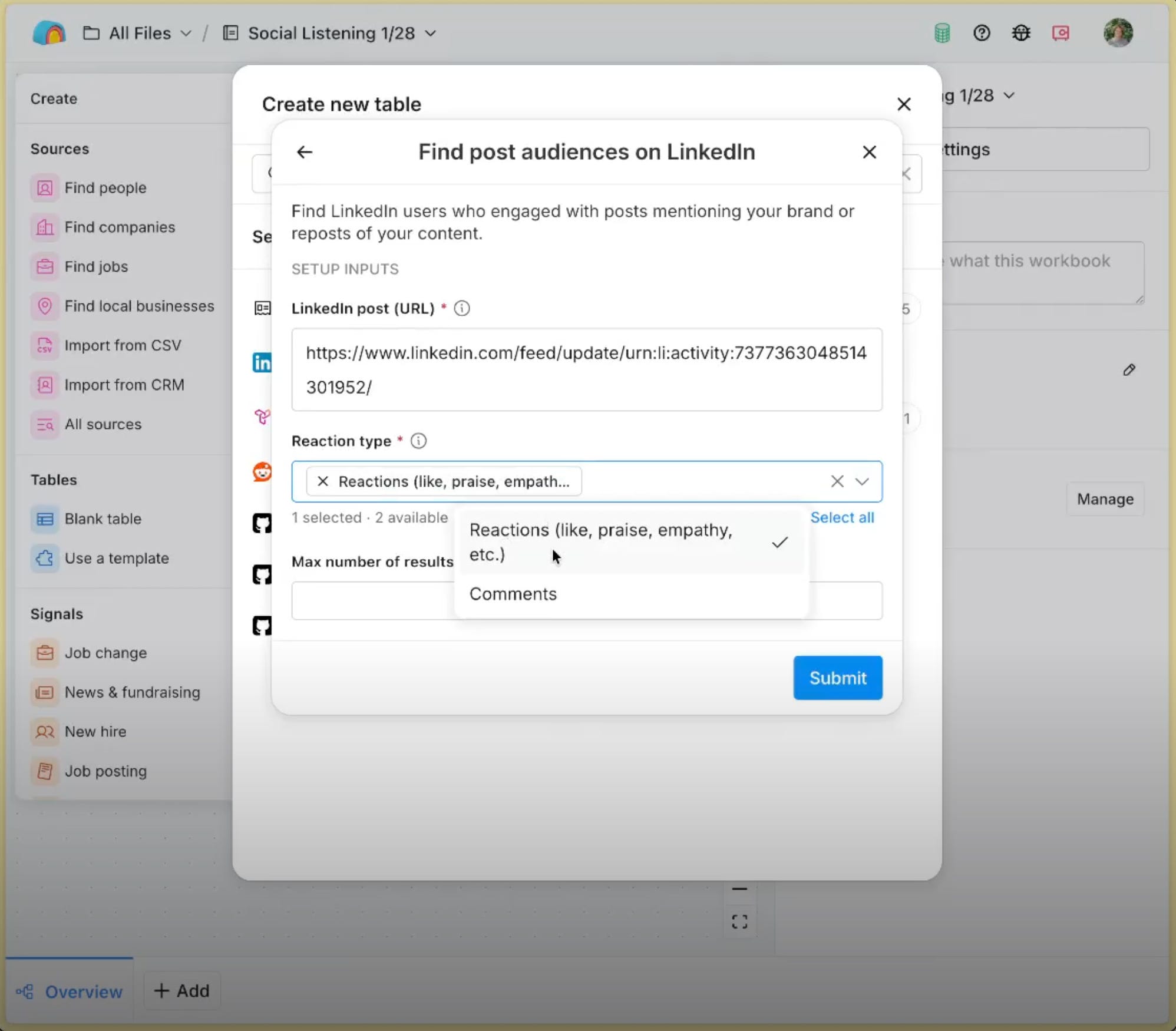
Clay monitors every post mentioning your company. For each post, we capture:
The post URL and content
Who posted it (name, LinkedIn URL, headline, company)
All reactors with their LinkedIn profiles, headlines, and company information
All commenters with their LinkedIn profiles, headlines, company information, and exactly what they said in comments
This creates a one-to-many relationship: one post has many reactions and comments. Clay handles this structure natively, writing all reactions and comments to a separate table for enrichment.
2. Enrich and qualify the engagers
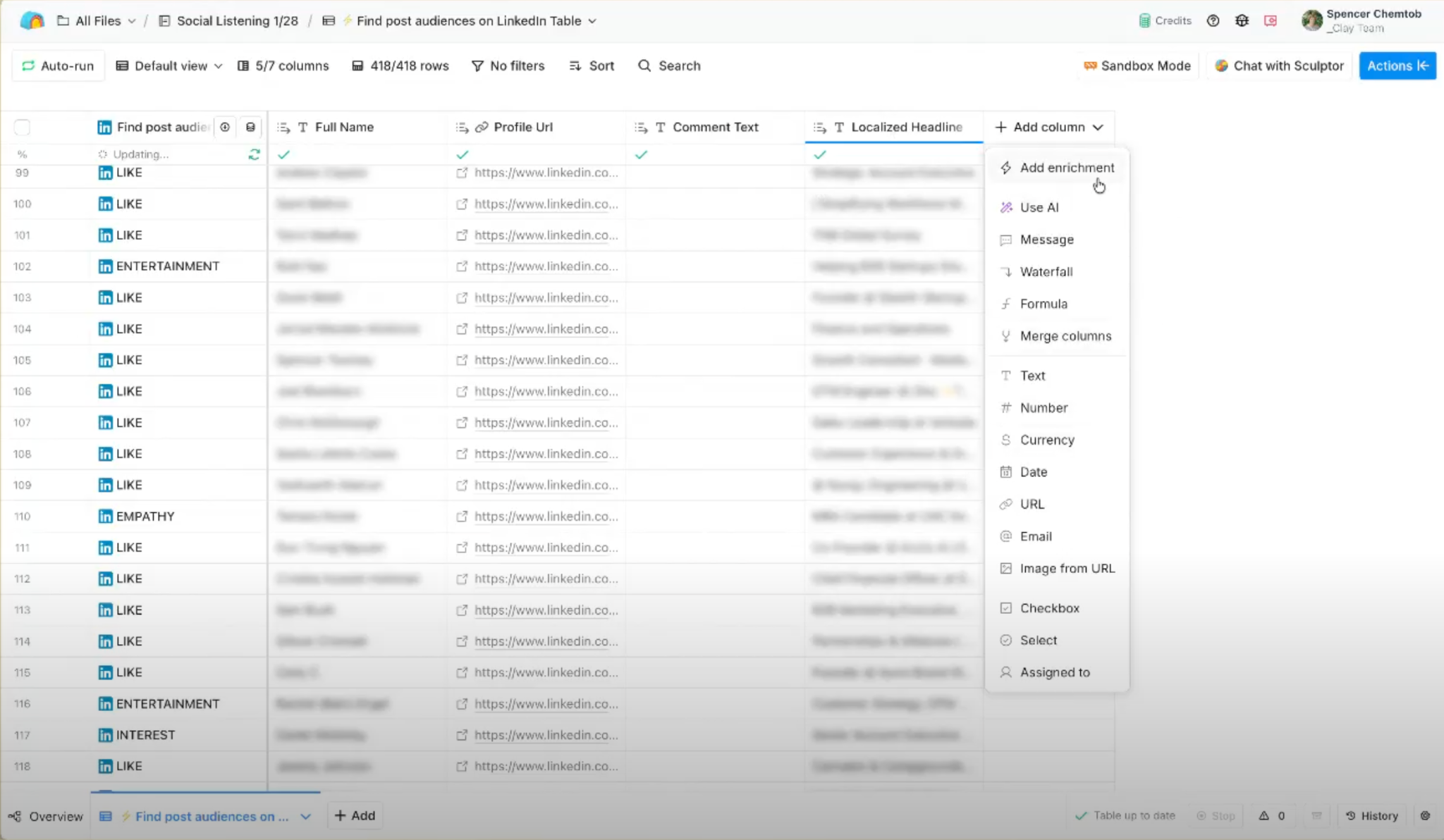
Once we have the raw engagement data, we enrich each person to determine if they’re qualified:
Match LinkedIn profiles to accounts in your CRM using the account object’s LinkedIn URL field
Check against your named account list or tier definitions to identify which engagements come from tier 1 target accounts versus noise
Enrich with work emails using waterfall enrichment across multiple providers
Capture their current role, company details, and any other relevant firmographic data
This tells us exactly which engagements came from target accounts. A post might get 100 reactions, but only 15 come from tier 1 accounts—those are the ones sales should care about.
3. Take action on qualified leads
For engagers who match our ICP:
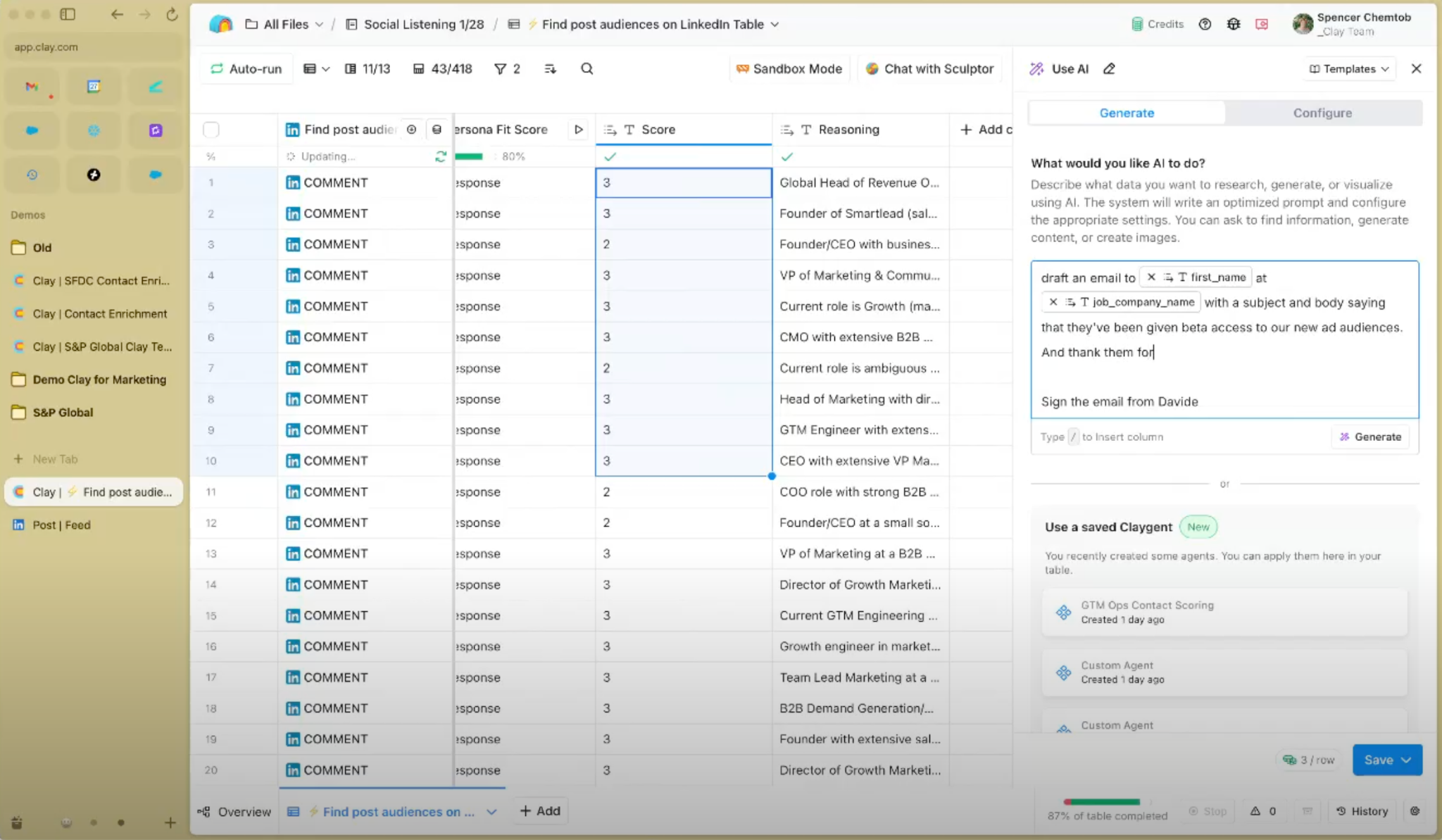
Send automated, personalized emails to people who commented or requested information, drafted using AI based on what they said
Queue emails in Clay’s Sequencer for automated sending
Route qualified engagements back to LinkedIn via tools like HeyReach for connection requests or InMail
Alert sales reps when target accounts in their territory engage with content
This closes the loop from content creation to pipeline generation. Someone engages with your LinkedIn content, gets automatically qualified, and receives personalized outreach—all without manual work from your team.
The impact: From cost-per-engagement to cost-per-qualified-engagement
Before building this system, Clay measured influencer performance using cost per engagement: if an influencer generated 100 reactions and we paid them $100, that’s a $1 cost per engagement.
This metric told us nothing useful. A post could get 100 reactions from completely unqualified accounts—students, competitors, random people who’ll never buy—and we’d call it successful.
Now we measure cost per qualified engagement. If that same influencer post generates 20 reactions from tier 1 target accounts, we’ve actually paid $5 per qualified lead. That’s a metric we can compare to other lead generation channels.
This shift fundamentally changed how our marketing and sales teams work together. Marketing can prove their LinkedIn investment reaches accounts sales actually cares about. Sales gets automatic alerts when target accounts engage with content. Ops has built the infrastructure that makes both sides happy.
As Spencer Chemtob, Clay GTME, put it: “The sales team actually wants us to do more of these things now.”
How it works in Clay: The technical implementation
Step 1: Connect LinkedIn as a data source
Clay’s LinkedIn source integration appears when you create a new table. Search for “LinkedIn” and select “Find posts.”
This source lets you track every post mentioning your company. Every time someone posts about your company, it appears in your table with:
Post URL
Poster information (LinkedIn URL, name, headline, company)
Reaction count
Comment count
Full post text
The source updates automatically, pulling new posts as they appear.
Step 2: Set up one-to-many relationships for reactions and comments
Each post has two one-to-many relationships we need to extract:
Reactions: One post → many people who reacted. For each reactor, we capture:
Full name
LinkedIn URL
Headline/title
Type of reaction (like, celebrate, support, etc.)
Comments: One post → many comments. For each commenter, we capture:
Full name
LinkedIn URL
Headline/title
Comment text
Whether it’s a reply to another comment
Clay handles these one-to-many relationships natively. Write all engagement data to a separate table called “Engagements” where each row represents one person’s engagement with one post.
Step 3: Enrich and match to your CRM
With all engagers in a dedicated table, run enrichment workflows:
Match LinkedIn URLs to your CRM account records: Look up the person’s LinkedIn URL in your Salesforce or HubSpot account object. This requires that your CRM has a LinkedIn URL field on accounts (which you should be populating through your core enrichment flows).
If the LinkedIn URL matches an account in your CRM, pull the account’s named account status or tier definitions. This is the critical step that determines whether someone is qualified.
Enrich with work emails: For qualified engagers, use waterfall enrichment to find their work email using their name, company, LinkedIn URL, and multiple data providers in sequence.
Step 4: Build automated outreach workflows
Once you know who’s qualified and have their contact information, automate the follow-up:
Draft personalized emails using AI: The prompt should reference what they commented or what the post was about. For example: “I saw you commented on our post about closing the loop between marketing and sales. Would love to hear your thoughts—are you free to chat this week?”
Queue emails in Clay’s Sequencer: Set conditions to only send if the person meets your qualification criteria (tier 1 or tier 2 account, valid work email found, etc.).
Or route back to LinkedIn using integrations like HeyReach: Send connection requests or InMail messages that reference their engagement with your content. The advantage is you’re engaging people on the same channel where they already showed interest.
Step 5: Alert sales when target accounts engage
Update your CRM with the engagement signal so reps can see which accounts are engaging with your content:
Write the post URL, engagement date, and type of engagement back to Salesforce or HubSpot
Build a report showing which tier 1 accounts have recently engaged with LinkedIn content
Configure alerts when accounts in a rep’s territory engage with posts
This gives sales teams visibility into which target accounts are already aware of your brand and actively consuming your content.
What you need to build this
Required:
CRM with LinkedIn URL fields on account records (Salesforce, HubSpot, etc.)
Named account list or tier definitions in your CRM
Target account definitions that sales and marketing agree on
Optional but recommended:
Email sequencing tool or Clay Sequencer for automated outreach
LinkedIn outreach tool like HeyReach for engaging people back on LinkedIn
Influencer tracking system to measure cost per qualified engagement by creator
What the data reveals
Running this system for several months has surfaced insights we couldn’t see before:
Hit rate on qualified engagement: A post might get 100 reactions, but only 15 come from tier 1 or tier 2 accounts. That’s your real hit rate—the percentage of engagement that actually matters to sales.
Different content types and creators have dramatically different hit rates. Some influencers generate lots of total engagement but low qualified engagement. Others have smaller reach but higher percentages from target accounts.
Which accounts are engaging but not converting: You can identify tier 1 accounts that consistently engage with your content but haven’t entered your sales pipeline. These are warm leads that might need different outreach or messaging.
Seller enablement signals: Individual reps can see when accounts in their territory engage with LinkedIn content. This gives them a natural reason to reach out: “I saw you commented on our post about territory planning—is that something you’re thinking about for your team?”
Getting started: Implementation roadmap
Phase 1: Set up data collection
Connect LinkedIn as a source in Clay
Configure monitoring for posts mentioning your company
Build the table structure for posts, reactions, and comments
Verify data is flowing correctly
Start with one high-performing post. Pull the engagement data, enrich it, and see how many reactions came from target accounts versus everyone else. That hit rate tells you whether your LinkedIn strategy is actually reaching the people you want to sell to.
Phase 2: Build enrichment workflows
Set up CRM lookup using LinkedIn URLs
Configure waterfall email enrichment
Test matching logic with a sample of engagers
Refine qualification criteria based on initial results
Phase 3: Create outreach workflows
Draft email templates for different engagement types (reactions vs. comments vs. information requests)
Set up Clay Sequencer or connect your email automation tool
Configure conditions for when emails should send
Test with a small batch of qualified engagers
Phase 4: Close the loop with sales
Write engagement signals back to your CRM
Build reports showing LinkedIn engagement by target account
Train sales team on how to use the data
Gather feedback and refine workflows
Then expand to track all posts mentioning your company. Build the automated workflows that route qualified engagement to sales. Close the loop between content investment and pipeline generation.
Common questions and edge cases
What if someone doesn’t have their company listed on LinkedIn?
Use Clay’s company enrichment to find their current employer based on their name and other profile information. Not everyone keeps their LinkedIn perfectly updated, but you can often infer company from their bio, previous roles, or other context clues.
How do you handle people who engage with multiple posts?
Track engagement at the person-post level. If someone reacts to three different posts, they appear in your engagement table three times. This actually gives you better signal—someone who engages multiple times is more qualified than someone who reacted once.
What about competitors engaging with your content?
You’ll see some competitor engagement, especially on controversial or industry-trend posts. Build filters in your CRM lookup to exclude competitor domains or flag them separately. You don’t want to route competitor employees to your sales team as qualified leads.
How do you avoid spamming people who just casually engaged?
Set engagement thresholds. Someone who just reacted might get added to a nurture campaign. Someone who commented or requested information gets direct outreach. Someone who engaged multiple times or asked specific questions gets priority routing to sales.
Common mistakes to avoid
Qualifying too loosely: If you route every LinkedIn engager to sales, you’ll destroy trust in the system. Only route people who genuinely match your ICP based on firmographic data and named account status.
Not updating your named account list: If your target account definitions are six months old, the qualified engagement data will be wrong. Keep your tier definitions current in your CRM and the system will reflect accurate qualification.
Forgetting to close the loop: The system is only valuable if sales can see which accounts engaged and use that information. Update your CRM, build reports, and train reps on how to use the signals.
Measuring total engagement instead of qualified engagement: The whole point is distinguishing signal from noise. If you keep reporting total reaction counts, you haven’t changed anything.
The broader impact
This system fundamentally changes how marketing and sales work together.
Marketing can finally prove ROI. Instead of reporting vanity metrics like total impressions or engagement counts, they can show how many Tier 1 accounts engaged with each piece of content. They can compare cost per qualified engagement across different creators and content types. They can demonstrate that LinkedIn investment is actually reaching target accounts.
Sales stops ignoring LinkedIn signals. When reps see that engagers have already been qualified against the named account list and enriched with contact information, they trust the leads. They start asking marketing to produce more content because they’re seeing pipeline from it.
Ops becomes the bridge instead of the bottleneck. Instead of manually checking each LinkedIn comment to see if the person is qualified, ops builds the system once and it runs automatically. They shift from reactive processing to strategic analysis of which content and channels drive the most qualified engagement.
Beyond LinkedIn: the same approach for other channels
The principles here apply to any channel where you’re generating engagement but can’t tell which engagements matter:
Webinar attendees: Enrich and qualify everyone who registers or attends
Content downloads: Match form fills to your target account list
Event attendance: Identify which booth visitors are from tier 1 accounts
Podcast listeners: Track which accounts have people engaging with your podcast content
The pattern is always the same: capture the engagement signal, enrich the people, match them to your qualification criteria, route qualified leads to sales, and measure hit rates on qualified engagement versus total engagement.
Brilliant breakdown of how to turn social noise into actionable signal. The shift from cost per engagement to cost per qualified engagment completely changes how you have conversations with leadership about marketing ROI. I tried building something similar manualy at a previous company and it took forever without proper automation. This is exactly the kind of operational infrastructure that makes sales and marketing alignment actually work.